
Cloud gaming technology has matured in the past two years. Although Google's Stadia is about to shut down, traditional game companies like Sony PlayStation are doing better and better. Recently, they have enabled mobile phones to connect to the console without Wi-Fi, so you can basically play PS4/PS5 anytime, anywhere (with internet access).
Friends in China may not understand the importance of mobile game controllers, because adding a controller to mobile games seems redundant. But what if you're playing PS5/PS4 and Xbox games on your phone?
For me, there are two application scenarios:
- Playing games in bed is a great idea. Handheld consoles are convenient, while home consoles are great for AAA games. What if you combined them to play AAA games while lying in bed? The PS Vita's remote connection to the PS4 solved this problem, but the lack of R3 and L3 is really a pain.
- When traveling, especially for business trips and returning home, this need used to be met by the Switch and PS Vita, but now a smartphone can do the job. (You don't even need a controller.)
The Remote Play feature on the PS has been around for a few years now. It used to be on the PS Vita, but now you can use your phone. Virtual buttons are really uncomfortable, so I did some research on external buttons and made a surprising discovery. I'd like to share it with you:
There are two main external controllers on the market: Backbone and Razer Kishi, both released in 2020. Basically, you insert your phone into the center of the controller and connect it to your console. Because it's cloud gaming, the game still runs on your PS, so there are no specific requirements for your phone's capabilities. The only requirements might be your home Wi-Fi bandwidth and mobile data (unlimited data plans are becoming increasingly cheaper).
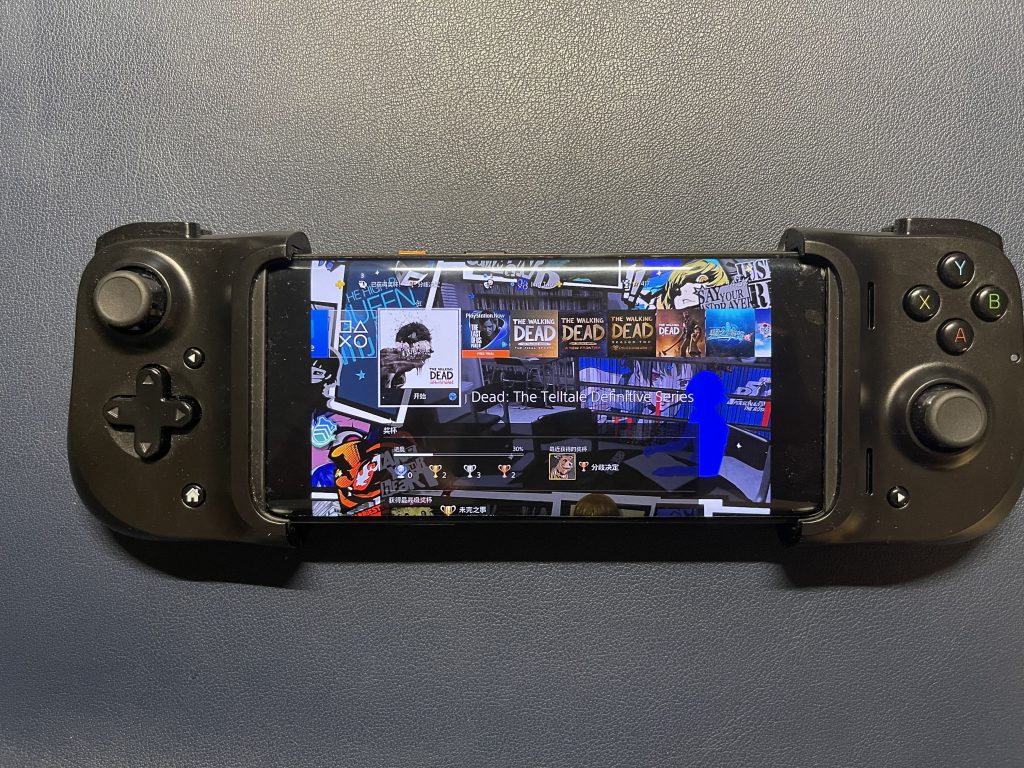
I happened to buy both, so I'm doing a comparison to hopefully help others. First, here's a photo of both controllers in use:

iOS and Android support
Backbone only supports iOS devices, while the Razer Kishi has Android and iOS versions, but these need to be purchased separately (due to different interfaces). The iOS version is slightly more expensive than the Android version. The Razer Kishi on Android does not directly support the official PS Remote; a third-party app, PS Play, needs to be downloaded separately to connect to the device. The experience is no worse than the official app, and the connection speed is even faster, but it costs .99. Furthermore, remote connection (when not on the same Wi-Fi network) requires separate setup (presumably because it cannot use Sony's encrypted communication).
Buttons and portability
In terms of feel and buttons, the Backbone is much more comfortable than the Razer Kishi, but it's not quite as good as a PS controller. However, if you're just playing casually, the difference isn't significant. It's worth mentioning, though, that the Backbone's button layout is based on the Switch, while the Razer Kishi is based on the Xbox; I personally prefer the Switch's layout. Also, the Backbone's vibration is exceptionally comfortable.
It's worth mentioning that the Razer Kishi has three menu buttons, while the Backbone has four. However, the Razer Kishi's three buttons correspond to home, start, and option, while the Backbone only has option and start buttons. I initially thought that the screenshot and home buttons would work, but they require an app, and specifically the screenshot and home buttons associated with that app, making them not very user-friendly.
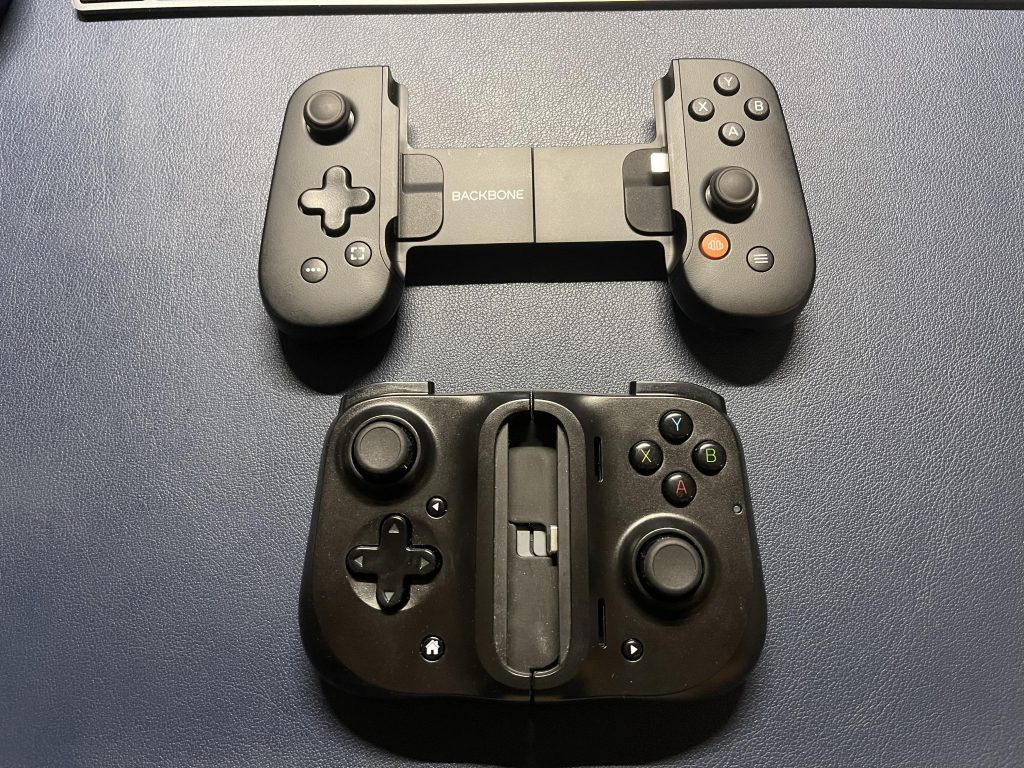
In terms of portability, the Razer Kishi is better because it's foldable, while the Backbone is not, and even in its smallest form, it's about the size of a power bank. (See picture)
External interface/headphone?
Both peripherals have an external interface. Because the gamepad occupies the interface at the bottom of the phone, it is not possible to charge or plug in headphones while using the gamepad. I originally thought that the interface reserved on the gamepad was for connecting headphones, but I was wrong. It can only be used to connect to an external power source for charging.
Unless it's a special phone (with a 3.5mm jack on the side), the only option for headphones is Bluetooth. However, the advantage is that you can play games while charging.
User experience
I didn't encounter any major problems with either peripheral, but the Backbone lacks a PS button (for returning to the desktop), and even after installing its app, the issue persisted. They even changed the screenshot button to use their app's screenshot function, and another button to switch to their own app. Switching out of the app disconnects PS, requiring reconnection, which is very inconvenient and feels like it wasn't designed for PS. Furthermore, the app registration process is cumbersome, unlike the Razer Kishi which doesn't have this problem.
However, after installing the app, I discovered that the controller can actually play many other games. I tried it out and it felt great. It seems that it was originally designed for mobile games.
In addition, some Android phones come with a full-screen display, while iPhones do not, making the full-screen display more comfortable for gaming.
Summarize
If you're using iOS, choose Backbone; the button comfort is much better. The Razer Kishi feels very plasticky and the buttons are uncomfortable. But if you're using an Android phone, then you have no choice but to choose the Razer Kishi.
Regarding PlayStation support, the Razer Kishi Android requires purchasing a third-party app, which is quite annoying, and this unofficial app requires separate setup for remote connection. Both controllers work fine on iOS, but the Backbone lacks a home screen button; while you can tap the screen to do so, it's still rather inconvenient.
Overall, while it has some flaws, it solves the main problems. I'll take it with me on business trips and vacations; it's perfect for playing narrative-driven games or RPGs (like Life is Strange and Trails of Eden). (Occasionally, latency may still occur on different networks.)
This siteOriginal articleAll follow "Attribution-NonCommercial-ShareAlike 4.0 License (CC BY-NC-SA 4.0)Please retain the following annotations when sharing or adapting:
Original author:Jake Tao,source:"Mobile Phone Controller Comparison: Backbone vs Razer Kishi"


